Each person sees what's theirs. And does what you let them.
If the whole team can do everything, a brand-new agent reads other people's chats, sees your customers' phone numbers and exports whatever they want. With permissions by role, you decide what each person can do.
- 7 days free
- No credit card required
- Included in Premium
- Lucía Gómez+1 415 555 0142
- Carlos Ruiz+1 415 555 0163
- Elena Torres+1 415 555 0187
- Pedro Sanz+1 415 555 0119Unassigned
- Read
- All chats
- Reply
- All chats
- Assign
- All chats
- Export
- Yes
Sara sees everything and can do everything on this number.
- Lucía Gómez+1 415 555 0142
- Carlos Ruiz+1 415 555 0163
- Elena Torres+1 415 555 0187
- Pedro Sanz+1 415 555 0119Unassigned
- Read
- All chats
- Reply
- All chats
- Assign
- All chats
- Export
- No
Marc assigns and supervises every chat, but can't export.
- Elena Torres+1 415 ••• ••87
- Pedro Sanz+1 415 ••• ••19Unassigned
- 2 chats from other teammates, hidden
- Read
- Their own and new ones
- Reply
- Only their own
- Assign
- No
- Export
- No
Nadia sees her chats and new unassigned ones. Not Sara's or Marc's, and not the phone numbers.
Access to just what's needed, no hassle.
Three fixed roles and, for each one, what it can do with your number's chats.
Sample active scopes per role Action Administrator Supervisor Agent Read chats 4 / 4 4 / 4 2 / 4 Reply to chats 4 / 4 3 / 4 1 / 4 Assign chats 4 / 4 4 / 4 0 / 4 View phone numbers 4 / 4 4 / 4 0 / 4 Action by action
Read, reply, assign, resolve, delete, export, start chats and view phone numbers. Each action has its own scope per role: all chats, new ones, a teammate's or their own.
- Elena Torres+1 415 ••• ••87
Without seeing the phone number
An agent can help a customer without ever seeing their number.
Your role can't export
Exports, only for the right people
Exports, search and files are checked on the server, not just on screen.
- OwnerEverything, always
- AdministratorChanges supervisor and agent
- SupervisorChanges agent
- AgentChanges no permissions
Each person, up to their own role
Nobody changes the permissions of a role equal to or above their own. An administrator adjusts supervisors and agents, and a supervisor adjusts agents.
- Sales+1 415 555 0141Agent: only their chats
- Support+1 415 555 0199Agent: all chats
Number by number
If you have several numbers, each one has its own permissions.
Agent · Read chatsAll chatsTheir own and new ones
Chats stay where they were
Changes delete nothing
Changing a rule doesn't delete or move any chat. It only changes what each person sees and can do from then on.
Set up in four steps.
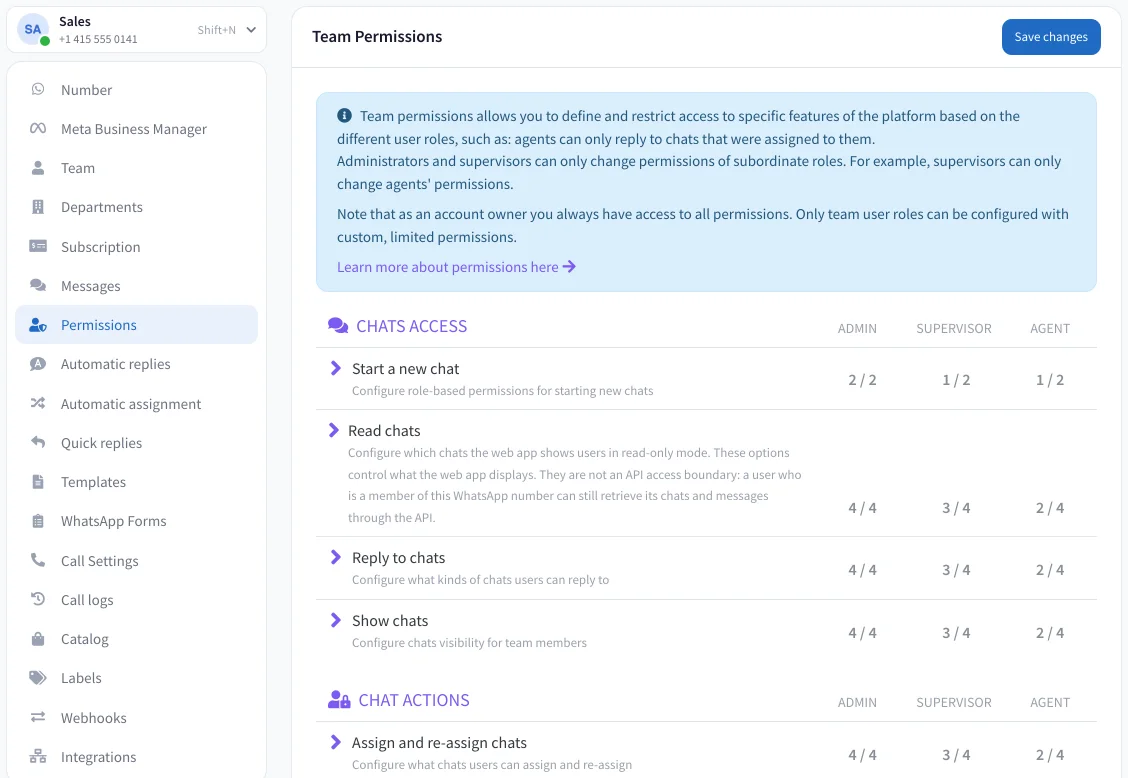
This is the PulpoChat permissions screen. Each step shows you where it is.
Open Permissions
In the number's settings, go to Permissions. All the actions are there, grouped by chats, contacts and number.
Pick an action
For example, Reply to chats. Expand it and you'll see its scopes: all, new unassigned ones, a teammate's and their own.
Decide by role
Tick which scopes the administrator, the supervisor and the agent have. The count tells you how many each one has active.
Save the changes
Review the list of changes and apply them. From then on each person sees what's theirs, and no chat moves.
Permissions come with the biggest plan.
You pay per number per month, with the people in your plan included.
Permissions by role on Premium
On the other plans, the whole team on the number has access to all its chats.
- 10 people per number
- Administrator, supervisor and agent
- Automatic assignment
- Team reports
99€a month per number
Seven days free, no card.
More for your team
- Shared inboxThe whole team on the same number, every chat with its owner.
- Automatic assignmentAdvanced and PremiumEach new chat goes to whoever has had the fewest.
- Automatic repliesWelcome and out-of-hours messages, in your own words.
- ReportsAdvanced and PremiumResponse times per person, updated every hour.
Before you hand out permissions.
What roles are there?
Three: administrator, supervisor and agent. The account owner always has every permission, and those can't be reduced.
Can I create my own roles?
No. There are just those three roles. What you adjust is what each one can do, action by action.
Can an agent see only their own chats?
Yes. You can let each agent read and reply only to the chats assigned to them, plus new unassigned ones if you want.
Does hiding a chat also protect it in the API?
No. The read and show chat permissions decide what PulpoChat displays, not what the API allows: any member of the number can request its chats through the API. Exports, search and files, though, are checked on the server.
Who can change permissions?
The account owner, administrators and, by default, supervisors. Each one only changes the permissions of roles below their own: a supervisor, those of agents.
Can I set different permissions per department?
No. Permissions are set by role and by number. If you have several numbers, each one has its own.
Does changing a permission delete or move chats?
No. Changing a rule doesn't delete or move any chat. It only changes what each person sees and can do from then on.
Which plan includes them?
On Premium. On the other plans, the whole team on the number has access to all its chats.
Give your team access, not access to everything.
Choose what each role can do and change it whenever you like, without touching a single chat.
Seven days free, no card.