Your whole team on one WhatsApp. Every chat has its owner.
When the team shares one phone, two people reply to the same customer and someone else is left waiting. In PulpoChat you see who handles each chat, who has it open and who is typing.
- 7 days free
- No credit card required
- 4, 7, or 10 people per number
- Lucía GómezYes, please!
- Carlos RuizMarc is typing
- Elena TorresThanks, I'll get it on Thursday
- Pedro SanzWaiting 9 min
- Jorge VidalPerfect, thanks so much
Hi, do you have size 38 in blue?
@Marc can you check the stockroom? I'm dealing with a return.
Yes! We have one left. Want me to hold it for you until tomorrow?
Yes, please!
Sara is typing
A note for Marc, his reply and Sara already typing. All in the same chat.
Hi, do you have size 38 in blue?
Yes! We have one left. Want me to hold it for you until tomorrow?
Yes, please!
Lucía talks to your business in a single conversation. The internal note never reaches her.
Fewer "Are you on this one?" moments. More customers served.
The inbox brings the number's chats together and makes it clear who handles what.
- Lucía GómezMarc is viewing it
- Carlos RuizMarc is typing
- Pedro SanzUnassigned · waiting 9 min
See who's handling it
Each chat shows its owner, who has it open and who is typing. Before you reply, you already know if someone got there first.
- Internal note · Sara
@Nadia wants the invoice in the company's name.
Sara mentioned youNotes the customer never sees
Leave context inside the chat and mention a teammate with @. They get a notification; the customer gets nothing.
Nobody is left without a reply
Filter unassigned chats, the ones waiting for a reply and the pending ones. Tap a filter to see it.
- /horarioWe're open Monday to Saturday, 10:00 to 20:00.
- Order
- Return
- Paid
Quick replies and labels
Type / and pick a saved reply. Labels sort chats by order, return or whatever you use.
- New chat Pedro Sanz
- Mention Sara mentioned you
- Email You have 2 unanswered chats
Notifications wherever you are
A new chat or a mention reaches you on your desktop, your phone and by email.
- Browser
- Lucía Gómez
- Carlos Ruiz
- Elena Torres
Android- Lucía
- Carlos
On your computer and your phone
The same inbox in the browser and in the Android app. On iPhone, in the browser. Assignments look the same on all of them.
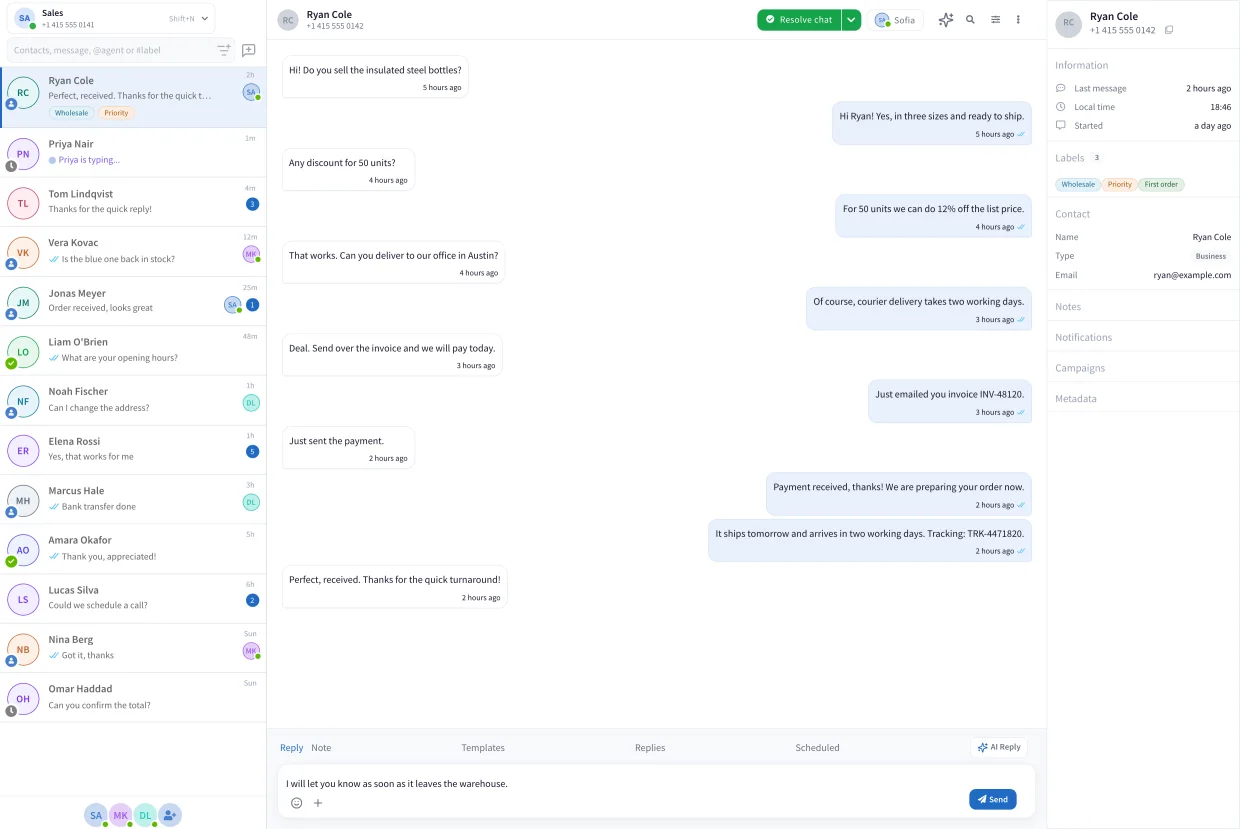
Four steps and your team is replying.
This is the PulpoChat inbox, with sample data. Each step shows you where it is.
Connect your number
Scan a QR code or connect the official WhatsApp Business API. Your customers keep writing to the same number.
Invite your team
Add each person with their email. Your plan sets how many fit on the number.
Hand out the chats
Assign each conversation to its owner, by hand or to whoever replies first. The rest of the team sees it right away.
Reply with context
Reply, leave an internal note for a teammate and mark the chat as resolved when you're done.
Every plan, team included.
You pay per number per month, with the people in your plan included.
Standard
39€a month per number
4 people on the same number- Shared inbox, internal notes and quick replies
- Unassigned, not replied and pending filters
- Welcome and away messages
Advanced
69€a month per number
7 people on the same number- Shared inbox, internal notes and quick replies
- Unassigned, not replied and pending filters
- Welcome and away messages
- Automatic assignment
- 3 departments
- 5 custom chat folders
- Team reports
Premium
99€a month per number
10 people on the same number- Shared inbox, internal notes and quick replies
- Unassigned, not replied and pending filters
- Welcome and away messages
- Automatic assignment
- 10 departments
- 10 custom chat folders
- Team reports
- Permissions by role
Seven days free, no card.
More for your team
Before you share your number.
Can two people reply to the same chat?
Yes. No one is shut out of a chat, so someone else can reply if needed. So you don't end up replying at the same time, each chat shows its owner, who has it open and who is typing.
Can the customer see internal notes?
No. Notes stay in PulpoChat and are never sent over WhatsApp. If you mention a teammate with @, they get a notification.
How many people can work on the same number?
4 people on Standard, 7 on Advanced and 10 on Premium.
Can I make each person see only their own chats?
Yes, on Premium. With permissions by role you decide which chats each agent can read and reply to, for example only the ones assigned to them.
Do I have to change my number?
No. You keep your number and your conversations.
Does it work with WhatsApp Business or with the official API?
Both. You connect your number by scanning a QR code or through the official WhatsApp Business API.
Can I handle chats from my phone?
Yes. There's an Android app, and on iPhone you use it in the browser. Notifications also reach you on your desktop and by email.
How do I see which chats still have no reply?
With the inbox filters: unassigned, not replied and pending. On Advanced and Premium you can also save your own chat folders.
Give every chat an owner.
Connect your number, invite your team and everyone replies from the same inbox.
Seven days free, no card.